Last week, I had 47 security questionnaires to fill out across three clients. Each one asking the same questions in slightly different ways: "Do you encrypt data at rest?" "What is your incident response time?" "List your subprocessors." In the old days, this meant copy-pasting from previous responses, praying I didn't accidentally give Client A's RTO to Client B, and spending hours on what should be mechanical work.
So I built a Claude Code skill to handle it. But here's the thing: I couldn't trust AI to just answer security questions. One hallucinated response about our encryption standards could torpedo a deal or, worse, create contractual liability. The skill needed guardrails—real ones.
This issue walks you through building a Claude Code skill that answers security questionnaires with evidence-based responses, confidence scoring, and human-in-the-loop governance. No hallucinations. No guessing. Every answer traceable to a source document.
INTEL DROP: The Questionnaire Problem
Security questionnaires are the paperwork tax of doing business. Every enterprise vendor assessment, SOC 2 audit prep, and customer due diligence process involves them. The problem isn't the questions—it's the repetition and the risk of inconsistency.

how your customers enter your inbox
Mid-size companies receive 50-200 security questionnaires per year, with 80% of questions being the same across questionnaires, just worded differently. The average 150-300 question assessment takes 4-8 hours to complete manually, with a 5-10% error rate. With a well-built skill, that drops to 30-45 minutes with less than 1% errors.
The natural instinct is to throw AI at the problem. But vanilla LLM responses are dangerous here—hallucinated security claims can create contractual obligations you can't meet. We need something smarter.
WHAT ARE CLAUDE CODE SKILLS?
Before we dive into building, let's clarify what Claude Code skills actually are. If you've used slash commands in Slack or Discord, the concept is similar—but far more powerful.
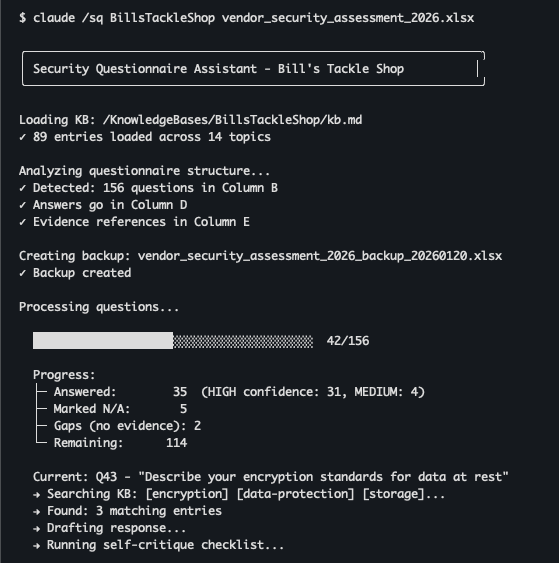
Skills (also called "commands" or "slash commands") are markdown files that contain instructions for Claude Code. When you invoke a skill with /skillname, Claude loads those instructions and follows them for the current task. For example, running /sq "Bill's Tackle Shop" security_questionnaire_2026.xlsx loads the skill instructions, reads the questionnaire, queries the knowledge base, and fills responses with source citations.
Skill File Location
Skills live in the .claude/commands/ directory. You can have:
./project/.claude/commands/ — available only in that project~/.claude/commands/ — available globally across all projectsFor our security questionnaire skill, I recommend user-level placement since you'll use it across multiple client directories.
Skill File Structure
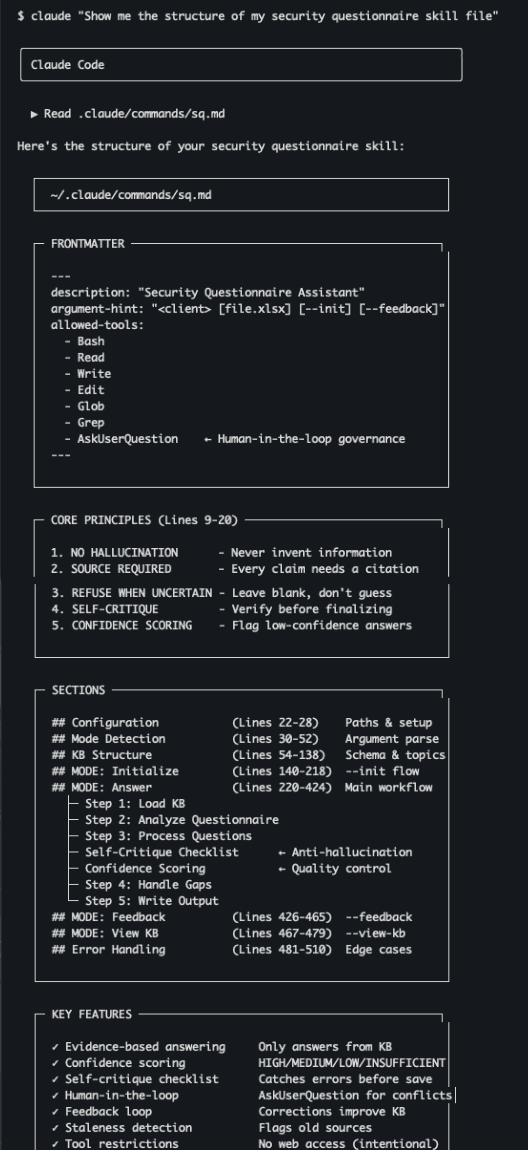
The frontmatter defines metadata: a description (shown when listing skills), argument hints for users, and critically, the allowed-tools that the skill can use. This is your first layer of governance—you control exactly what capabilities the skill has access to.
ANATOMY OF THE SKILL
Let's break down the key components of an effective security questionnaire skill. The full skill is several hundred lines, but here are the architectural decisions that matter.
Core Principles (The Non-Negotiables)
These principles are stated at the top of the skill file in bold, imperative language. Claude Code follows instructions more reliably when constraints are explicit and repeated:
Notice principle #3—leave blank if no evidence. This is the key anti-hallucination mechanism. It's better to have gaps that a human fills than fabricated answers that create liability.
The Knowledge Base Architecture
The skill doesn't answer from general knowledge—it answers from a structured Knowledge Base (KB) specific to each client. Each client gets their own KB directory containing verified facts with source citations. The Source field is critical—every fact must trace to a document. The Last Verified date triggers staleness warnings—if a source is over 6 months old, confidence automatically drops.
Mode Detection
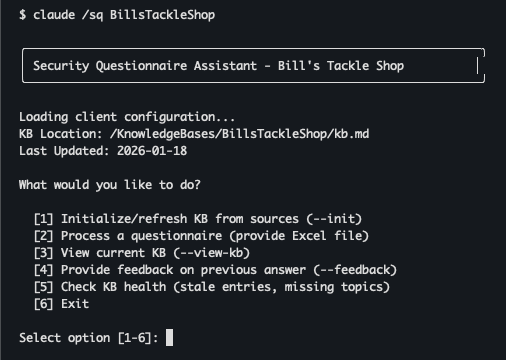
The skill supports multiple modes based on arguments: --init bootstraps the KB from sources, the main mode answers questionnaires, --view-kb displays the current KB, and --feedback processes corrections. Running without arguments shows an interactive menu.
PREVENTING HALLUCINATIONS
This is the heart of the skill. LLMs hallucinate. It's not a bug, it's a fundamental property of how they work. For security questionnaires, hallucinations are unacceptable. Here's how we prevent them:
Strategy 1: Evidence-Based Answering
The skill can only answer from the Knowledge Base. No general knowledge. No inference. No "based on common practices." The question processing flow is: parse the question to identify topic/domain, search the KB by tags and keywords, then perform an evidence check. If there's no match, the skill leaves the answer blank and marks it as a gap.
The key is: if there's no evidence, don't answer. The skill marks it as a gap and moves on. This creates a clear list of items needing human input rather than a questionnaire full of plausible-sounding fabrications.
Strategy 2: Confidence Scoring
Every answer gets a confidence score. HIGH confidence (90-100%) means a single authoritative source with exact match and recent verification—these are auto-accepted. MEDIUM (70-89%) means multiple sources synthesized or partial match—flagged for review. LOW (50-69%) means inferred from related info or source over 6 months old—flagged for review. INSUFFICIENT (below 50%) means no direct evidence—left blank.
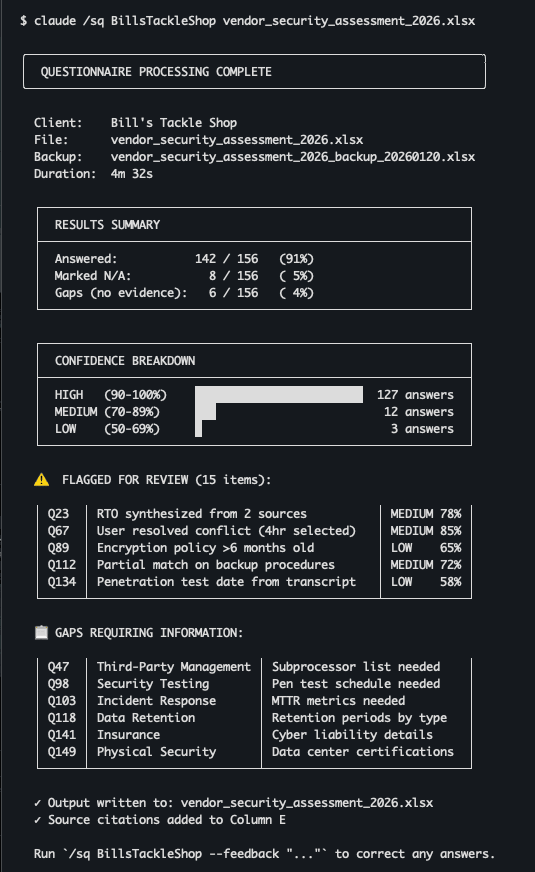
The final report shows exactly which answers need human review and why. You're not reviewing 150 answers—you're reviewing 15 flagged ones plus filling 5 gaps.
Strategy 3: Self-Critique Checklist
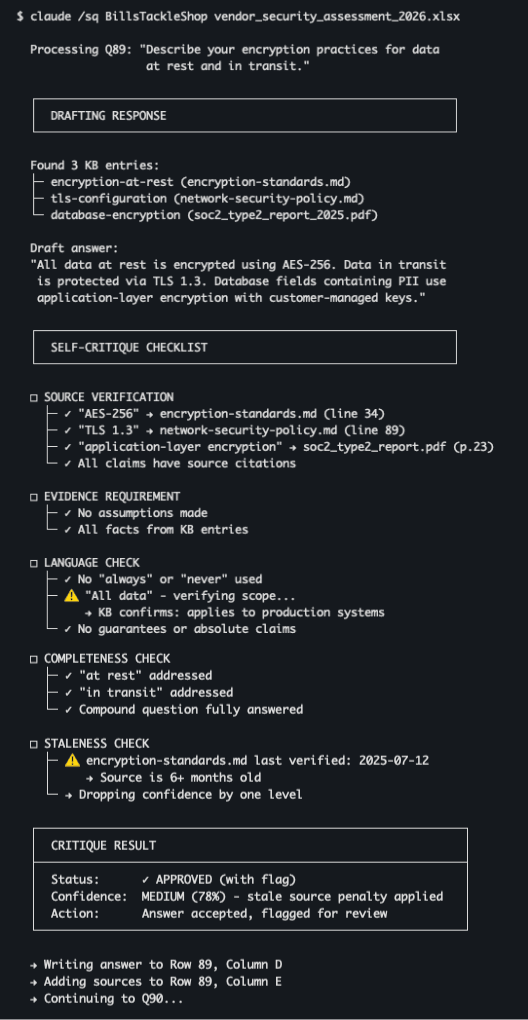
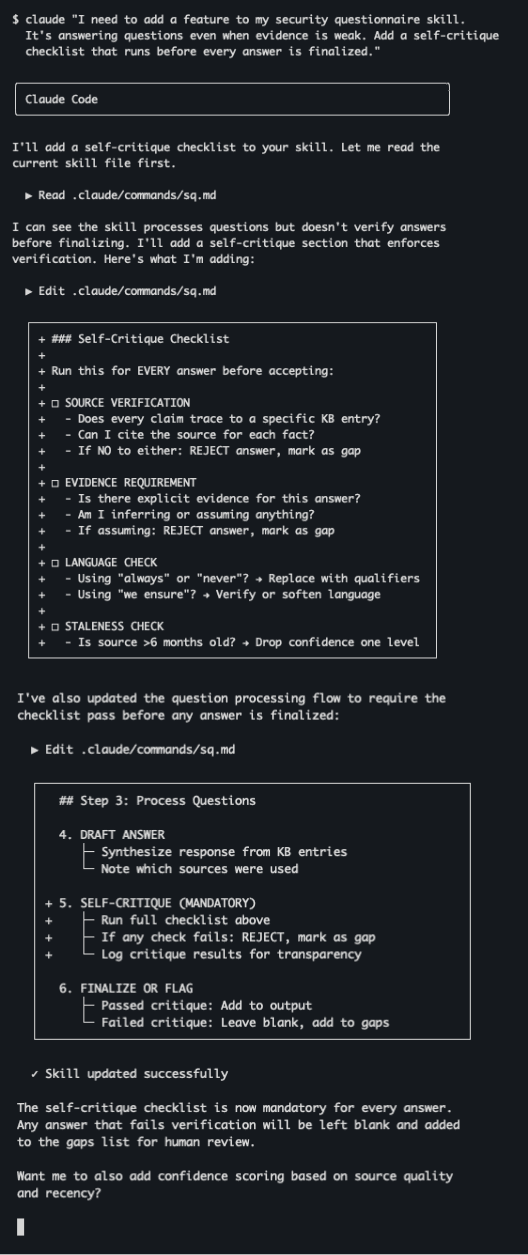
Before finalizing any answer, the skill runs a self-critique checklist. This is inspired by chain-of-thought prompting research—making Claude explicitly verify its own work catches errors. The checklist includes source verification (does every claim trace to a specific KB entry?), language check (using "always" or "never"? replace with qualifiers), completeness check (for compound questions, all parts addressed?), and confidence scoring based on source authority and recency.
The language check is subtle but important. Phrases like "we guarantee 99.99% uptime" might be true, but they create contractual expectations. The skill flags absolute language for human review.
HUMAN-IN-THE-LOOP GOVERNANCE
Even with all these safeguards, some decisions need a human. Claude Code provides the AskUserQuestion tool specifically for this purpose. It's your governance layer.
The AskUserQuestion Tool
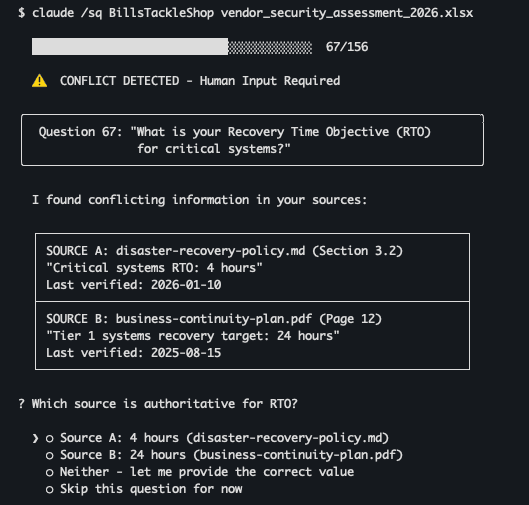
This tool pauses execution and presents a question to the user. The skill uses it in several critical scenarios: conflicting sources (two documents say different things about RTO), scope ambiguity (question asks about "production systems" but KB only has info for specific environments), filling gaps (no KB entry exists for a topic), and column mapping (Excel structure is ambiguous).
In the skill definition, you explicitly list AskUserQuestion in the allowed-tools frontmatter. Then in the instructions, you tell Claude when to use it: if sources contain conflicting information, stop, present both versions with source citations, ask the user which is authoritative, and record the resolution in the KB.
Governance Through Tool Restrictions
The allowed-tools frontmatter is another governance layer. For a security questionnaire skill, I recommend: Bash (for file operations), Read (read questionnaires and KB), Write (write updated KB and outputs), Edit (edit existing files), Glob (find source files), Grep (search content), Task (for complex sub-operations), and AskUserQuestion (human-in-the-loop).
Notice what's not included: no WebFetch, no WebSearch. The skill cannot go to the internet for answers—it can only use local sources. This is intentional. We don't want it pulling random information from the web and presenting it as our security posture.
The Feedback Loop
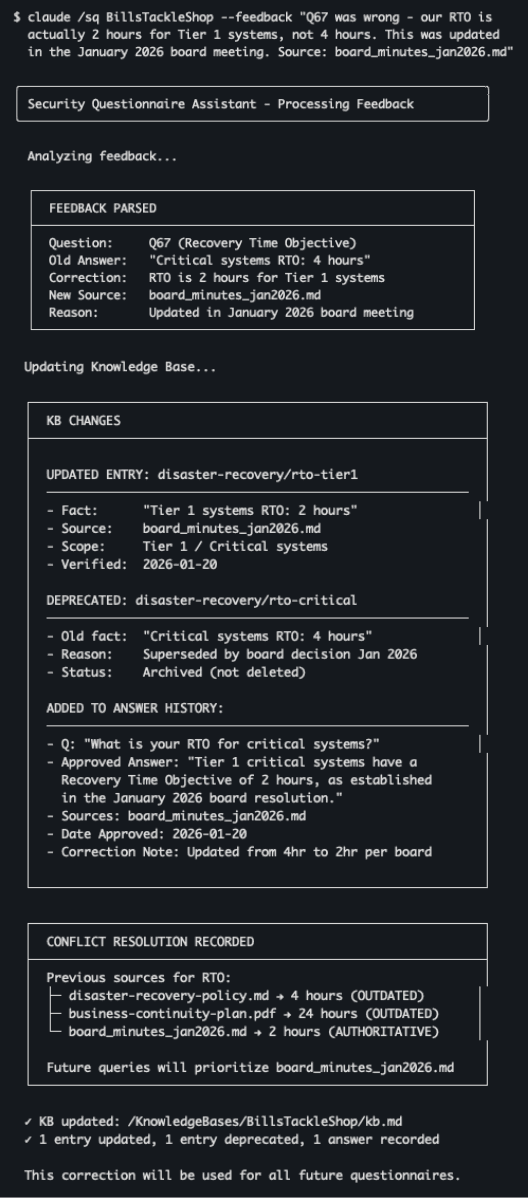
When the skill gets something wrong, the --feedback mode updates the KB. You provide the correction with the source, and the skill updates the KB entry with correct information, records the correction in Answer History, and notes the conflict for future reference. This creates a virtuous cycle: the more you use the skill, the more accurate the KB becomes. Corrections persist across sessions.
AI-ASSISTED DEVELOPMENT
Here's the meta-twist: I used Claude Code to help build the skill itself. This is one of the most powerful patterns for skill development.
Starting the Skill with AI Help
You can bootstrap the skill by telling Claude what you need: "I need to build a Claude Code skill for answering security questionnaires. Requirements: evidence-based answers from a knowledge base, no hallucination - leave blank if unsure, confidence scoring for every answer, human approval for ambiguous cases." Claude Code generates a solid first draft.
But the real value comes from iteration. When the skill is answering when it shouldn't, you ask Claude to add a self-critique checklist. Each iteration makes the skill more robust. I spent about 3 hours over two days refining the skill, testing it on real questionnaires, identifying failure modes, and adding guardrails.
Testing and Debugging with AI
When the skill misbehaves, Claude can help diagnose. If the skill answered a question about subprocessors even though the KB has no subprocessor list, you ask Claude to review the skill file and identify why the evidence check failed. This is the AI-assisted development loop:
PUTTING IT ALL TOGETHER
Let's walk through a complete workflow from KB initialization to questionnaire completion.
Step 1: Initialize the Knowledge Base
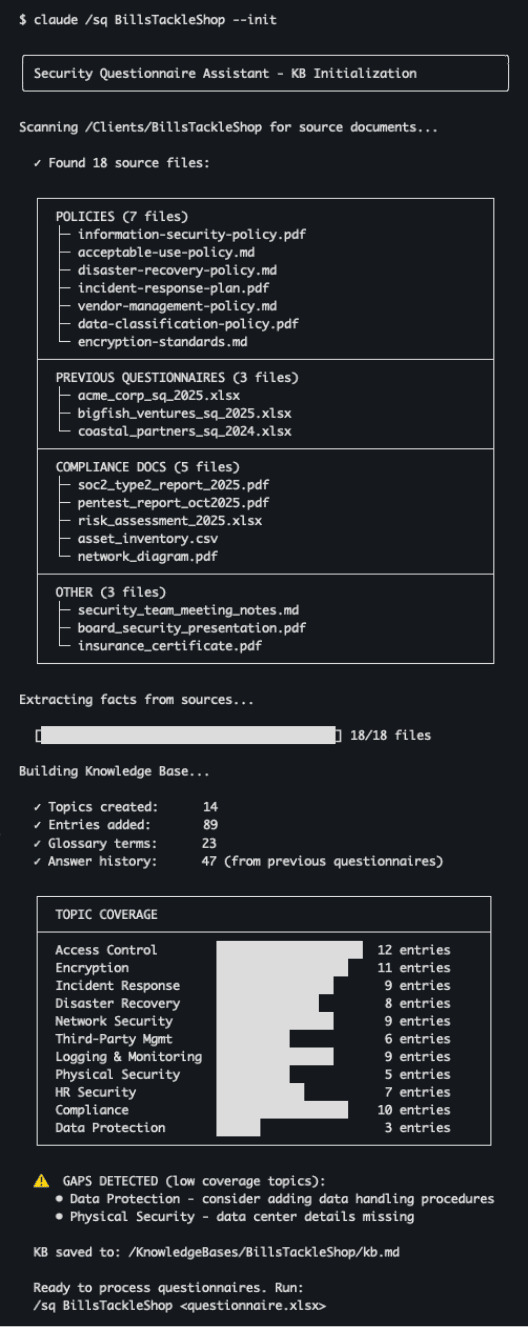
Run /sq "Bill's Tackle Shop" --init and the skill scans the client folder for source documents. It finds policy documents, previous questionnaires, meeting transcripts, and compliance reports, then builds the KB from those sources—creating topics, adding entries, and defining glossary terms.
Step 2: Process a Questionnaire
Run /sq "Bill's Tackle Shop" security_assessment_2026.xlsx and the skill loads the KB, analyzes the questionnaire structure, and processes each question. It shows progress as it goes, tracking answered questions, N/A responses, and gaps where no evidence exists.
Step 3: Review the Output
The skill produces a completion report showing results (answered, N/A, gaps), confidence breakdown (HIGH auto-accepted, MEDIUM and LOW flagged for review), specific items flagged for review with reasons and confidence percentages, and gaps requiring human input.
Building Your Own: Key Takeaways
If you want to build a similar skill, here are the patterns that matter:
THE BOTTOM LINE
Claude Code skills are more than automation—they're programmable AI assistants with guardrails you control. The security questionnaire skill we walked through isn't just about saving time (though it does save 6+ hours per assessment). It's about building AI systems you can actually trust.
The key insight: preventing hallucinations is an architectural problem, not a prompting problem. You can't just tell an LLM "don't hallucinate." You have to build systems where hallucination is structurally impossible—evidence-based answering, confidence scoring, human checkpoints, restricted capabilities.
And when you finally get it all working... you'll know exactly how Dr. Frankenstein felt.

IT'S ALIVE!
Start with a simple skill. Use the AskUserQuestion tool liberally. Let Claude help you refine it. Before long, you'll have a suite of specialized assistants that actually work the way you work.
The Illumenati // Boutique GRC for the AI-First Era // illumen.io
Want help building custom Claude Code skills for your GRC workflows? Whether it's security questionnaires, policy generation, or compliance automation, we can help you build AI systems with the governance your organization needs.